This switch, located on the control panel, is usually the push-button type. Start switches don't fail often, but it does happen. To check the start switch, remove the control panel and test the switch with a VOM set to the RX1 scale. Disconnect the leads from the switch terminals and clip one VOM probe to each terminal. Press the switch button. If the meter reads zero, the switch is working.
If the needle jumps to a high reading, the switch is faulty and should be replaced. Replace the switch with a new one of the same type, connecting the new switch the same way the old one was connected.
Servicing the Thermostat
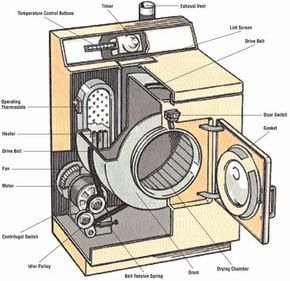
Thermostats, the dryer temperature control switches, are controlled by the temperature inside the dryer or by the heat of the motor. One or more thermostats on the panel can be adjusted to control the temperature in the dryer. Operating thermostats sometimes stick, causing control problems. These thermostats are usually positioned near the exhaust duct bulkhead or the fan housing of the dryer. Remove the back panel of the dryer to get at them.
Before you make any checks, try tapping the housing of the thermostats lightly with the handle of a screwdriver. This may jar the contacts loose. Temperature control switches are located behind the dryer control panel, and the panel must be removed for switch testing or replacement. Here's how to test and replace the thermostat:
Step 1: To check the control panel thermostat, make sure power is off to the dryer. Test the thermostat with a VOM set to the RX1 scale. Clip one probe of the VOM to each thermostat terminal. If the meter reads zero, the thermostat is working. If the needle jumps to a high reading, the thermostat is faulty and should be replaced.
Step 2: If necessary, replace the thermostat with a new one of the same type. Connect the new thermostat the same way the old one was connected.
Step 3: To check an operating thermostat, first make absolutely certain that the power to the dryer has been turned off and the dryer is cool. Then disconnect the leads to one side of the thermostat. Test an operating thermostat with a VOM set to the RX1 scale; clip one probe to each terminal of the thermostat. Disconnect the leads to one side of the thermostat so that the meter won't give a false reading. If the meter reads zero, the thermostat is working. If the needle jumps to a high reading, the thermostat is faulty and should be replaced.
Servicing the Timer
The dryer timer, located in back of the control panel, controls several things: the drying time of the clothes in the drum, the flow of electricity to the heating element, and the flow of power to the timer motor and the drum motor in the dryer cabinet.
Timers are driven by synchronous motors. Although the contact part of the timer can be cleaned and adjusted on some dryers, this is a job for a professional repair person. Timer motor repairs should also be handled by a professional, but you can replace a faulty timer yourself. Here's how to test and replace a dryer timer:
Step 1: To access the timer, remove the front of the control panel. On some dryers, the timer can be removed without removing the panel. In either case, pull the timer knob off the shaft and slip off the pointer. The pointer is usually keyed to the shaft by two flat surfaces to keep the pointer from slipping when it's turned.
Step 2: Test the timer with a VOM set to the RX1 scale. Turn the timer to the NORMAL DRY setting and disconnect one of the timer power leads. Some timers may have several wires connected to them: The power leads are usually larger than the other wires, and this size difference can be spotted under close examination. Clip one probe of the meter to each timer terminal. If the meter reads zero, the timer is working. If the needle jumps to a high reading, the timer is faulty and should be replaced. Replace the timer with a new one of the same size and type.
Step 3: To replace the timer, have a helper hold the new timer close to the old one, especially if there are several wires to be changed. Disconnect the old wires one at a time, connecting each corresponding new wire as you work, to make sure the connections are properly made. Or, draw a diagram detailing the proper connections. After all the wires are connected, check the connections again for accuracy.
A dryer that won't heat can't do its job. Learn how to assess heating problems for gas and electric dryers in the next section.